

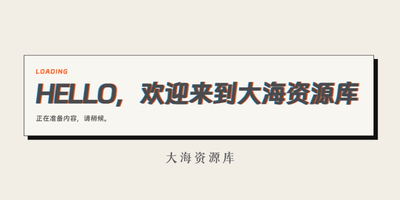
给wordpress站点添加一个开平加载动画效果,增强网站的个性化,教程适用于所以主题喜欢自行研究
一、打开主题所在的functions.php文件,位置一般都在/wp-content/themes/你的主题/functions.php
functions.php文件底部粘贴以下代码
// ===== 大海资源库开屏动画 START =====
// 修改位置:
// 1. 文案:改下面 HTML 里的 boot-label / boot-title / boot-desc。
// 2. 时间:改下面 JS 顶部 4 个常量,已保留中文备注。
// 3. 样式:CSS 已压缩,方便复制;如需改外观,改 <style> 里的对应 class。
// 技术说明:OneNav 主题可能没有调用 wp_body_open(),所以这里用 template_redirect + 输出缓冲,
// 自动把开屏 HTML/CSS/JS 插入到 <body> 后面,避免代码显示在页面上,也避免重复输出。
add_action(‘template_redirect’, ‘dh_boot_screen_buffer_start’);
function dh_boot_screen_buffer_start() {
if (is_admin() || wp_doing_ajax()) {
return;
}
ob_start(‘dh_boot_screen_insert_after_body’);
}
function dh_boot_screen_insert_after_body($html) {
if (strpos($html, ‘id=”bootScreen”‘) !== false) {
return $html;
}
$boot = <<<‘HTML’
<style>.boot-screen{position:fixed;inset:0;z-index:999999;display:grid;place-items:center;background:#f2eee5;transition:opacity .28s ease}.boot-screen.hide{opacity:0;pointer-events:none}.boot-card{width:min(720px,88vw);padding:24px;border:1px solid #111;background:rgba(255,255,255,.45);box-shadow:8px 8px 0 #111;transform:rotateX(18deg) rotateY(-14deg) translateY(-20px);animation:bootIn .55s ease forwards}.boot-screen.hide .boot-card{animation:magicOut .28s ease forwards}.boot-label{display:block;margin-bottom:10px;color:#ff5a18;font-size:12px;font-weight:700;letter-spacing:.14em}.boot-title{display:block;font-size:clamp(28px,5vw,52px);line-height:1;font-weight:900;letter-spacing:-.04em;text-transform:uppercase;text-shadow:2px 0 #ff5a18,-1px 0 #00a0ff}.boot-desc{margin:14px 0 0;font-size:14px;line-height:1.6;color:#555}@keyframes bootIn{to{transform:rotateX(0) rotateY(0) translateY(0)}}@keyframes magicOut{to{transform:translate(72px,-64px) rotateZ(14deg) scale(.72);filter:blur(8px);opacity:0}}</style>
<div class=”boot-screen” id=”bootScreen”>
<div class=”boot-card”>
<span class=”boot-label”>LOADING</span>
<!– 内容修改:主标题,乱码动画会作用在这一行 –>
<strong class=”boot-title” id=”bootTitle”>HELLO,欢迎来到大海资源库</strong>
<!– 内容修改:说明文字 –>
<p class=”boot-desc”>正在准备内容,请稍候。</p>
</div>
</div>
<script>
(function () {
// ===== 时间修改区 START =====
const SCRAMBLE_FRAME_COUNT = 14; // 乱码跳动次数:越大,乱码持续越久
const SCRAMBLE_FRAME_MS = 35; // 每次乱码跳动间隔:单位毫秒,越大越慢
const TEXT_HOLD_AFTER_LOAD_MS = 1000; // 文字加载完成后的停留时间:2000 = 2秒,200 = 0.2秒
const FADE_OUT_MS = 280; // 出场动画时间
// ===== 时间修改区 END =====
const bootScreen = document.querySelector(‘#bootScreen’);
const bootTitle = document.querySelector(‘#bootTitle’);
if (!bootScreen || !bootTitle) return;
const finalText = bootTitle.textContent;
const chars = ‘!<>-_\/[]{}#?’;
let frame = 0;
const timer = setInterval(function () {
bootTitle.textContent = finalText
.split(”)
.map(function (letter, index) {
return frame / SCRAMBLE_FRAME_COUNT > index / finalText.length
? letter
: chars[Math.floor(Math.random() * chars.length)];
})
.join(”);
frame++;
if (frame > SCRAMBLE_FRAME_COUNT) {
clearInterval(timer);
bootTitle.textContent = finalText;
setTimeout(function () {
bootScreen.classList.add(‘hide’);
setTimeout(function () {
bootScreen.remove();
}, FADE_OUT_MS);
}, TEXT_HOLD_AFTER_LOAD_MS);
}
}, SCRAMBLE_FRAME_MS);
})();
</script>
HTML;
$count = 0;
$html = preg_replace(‘/<body([^>]*)>/i’, ‘<body$1>’ . $boot, $html, 1, $count);
return $count ? $html : $boot . $html;
}
// ===== 大海资源库开屏动画 END =====
二、如果你的主题设置里有自定义代码代码功能也可以添加,保存刷新缓存即可。


评论
请先登录后发表评论